How to Read YouTube Creator Analytics and Build a Better Content Strategy
When a YouTube creator sends you their channel analytics, the goal should not be simply to decide whether the creator is “good” or “bad.” The data should help you understand the audience, predict how relevant content may perform, and design a sponsorship that fits the way people already watch the channel.
Many brands still evaluate creators using public information such as subscriber count, total views, and recent upload performance. These numbers are useful, but they cannot tell you where viewers are located, how they discover the videos, which sections hold their attention, or what type of content they return to watch.
A better review should answer four questions:
- Is this the right audience for the product?
- How does the audience discover the creator’s content?
- What keeps viewers watching?
- How should the answers change the sponsored-content strategy?
This guide is based on my experience reviewing YouTube creator analytics for photography and consumer-electronics partnerships. The examples have been anonymized, and some figures have been adjusted to protect commercial information.
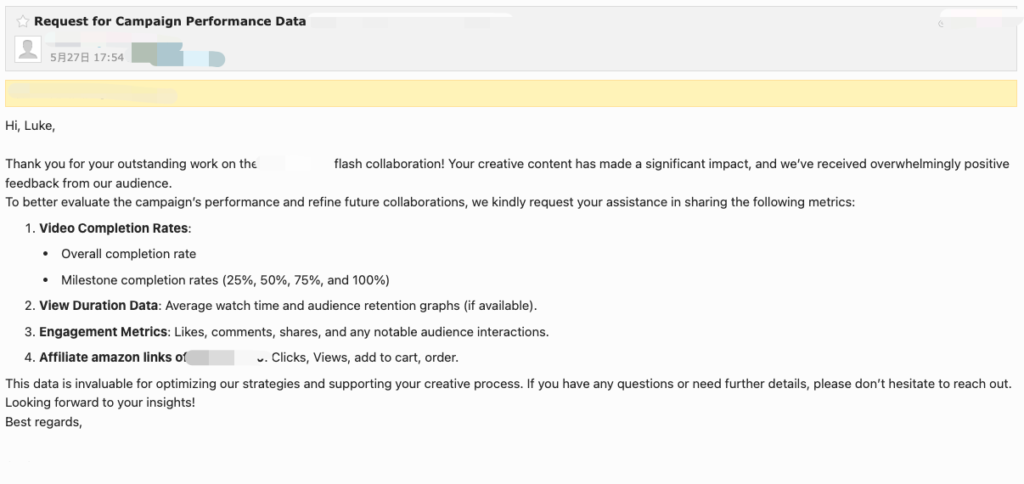
What Analytics Should Brands Request?
Brands do not need full access to a creator’s YouTube account. A small set of relevant screenshots and reports is usually enough to support a campaign decision.
Start by requesting four groups of information.
Audience data
Ask for:
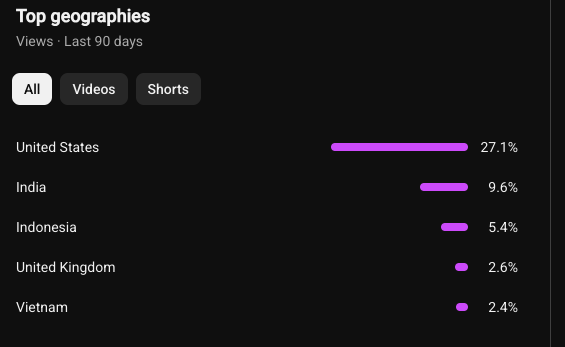
- Top geographies
- Monthly audience
- New, casual, and regular viewers
- Returning viewers
- Age and gender, when available
- Device type
- Watch time from subscribers and non-subscribers
YouTube’s Audience section can show the channel’s active audience, including new, casual, and regular viewers. These groups help creators understand how often people return to the channel, rather than relying only on the accumulated subscriber count.
Video-performance data
For relevant videos, request:
- Views
- Impressions
- Impressions click-through rate
- Watch time
- Average view duration
- Average percentage viewed
- Audience-retention reports
Traffic-source data
Ask how viewers discovered the content, including:
- YouTube Search
- Suggested videos
- Browse features
- External websites or apps
- Shorts feed, when relevant
YouTube’s Reach reports include impressions, CTR, views, unique viewers, and information about how audiences discover a video. Its Engagement reports include watch time and average view duration.
Comparable video data
Do not ask only for the channel-wide average. Request data for:
- The latest 10 to 15 videos related to your product category
- Recent sponsored videos
- Videos using the same format as the planned partnership
- One or two representative retention reports
A dedicated product review should be compared with other reviews, not with Shorts, livestreams, entertainment videos, or unrelated viral uploads.
Start with Audience Fit
Audience information should be reviewed before video-performance data because strong views have limited value when the viewers are not potential customers.
First, check whether the audience is concentrated in the markets where the product is available. A creator may receive 100,000 views, but only a small part of that reach may be commercially relevant when the campaign targets one country.
Next, consider whether the channel’s audience is likely to need the product. For a professional lighting brand, an audience of wedding, portrait, event, and commercial photographers may be more valuable than a larger audience that watches general technology content.
The most important audience factors depend on the product. Location and product interest matter in most campaigns. Profession, experience, budget, and use case become more important for specialist or high-priced products.
The balance between new and returning viewers can also influence the content approach. If many viewers are new to the channel, the sponsored video may need to explain the product category and brand more clearly. If the channel has a strong base of regular viewers, a deeper review, long-term test, or advanced workflow may be more suitable.
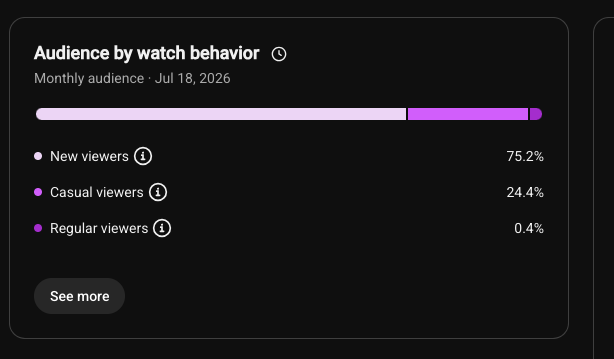
YouTube recommends using audience data to understand who is watching and to guide future content decisions.
Understand Traffic Sources and Click-Through Rate
Traffic sources show why people arrive at a creator’s videos. This should influence both the topic and the presentation of the sponsored content.
If YouTube Search is a major source, viewers are probably arriving with a clear question or problem. Suitable formats may include:
- Tutorials
- Product reviews
- Comparisons
- Buying guides
- Troubleshooting videos
The title should clearly describe the problem being solved. A searchable title such as “How to Balance Flash and Ambient Light” may fit the channel better than a general product announcement.
If Suggested videos and Browse features are the main sources, packaging becomes more important. The content may require a stronger idea, thumbnail, headline, and opening rather than a straightforward product name.
Impressions and CTR can help evaluate this packaging, but they should not be interpreted separately. YouTube notes that CTR represents only impressions counted on YouTube and that its meaning depends on factors such as traffic source and audience context.
For example:
- High impressions and low CTR may suggest that the topic, title, or thumbnail is not attractive enough.
- High CTR and weak watch time may suggest that the title attracted clicks but the video did not meet viewer expectations.
- Low impressions do not automatically mean the content is poor. The topic may be narrow, highly specialized, or still being tested with viewers.
Example:
I’ll work with a youtuber and he is good at testing camera and camera-related products and here are the screenshot he shared with us:
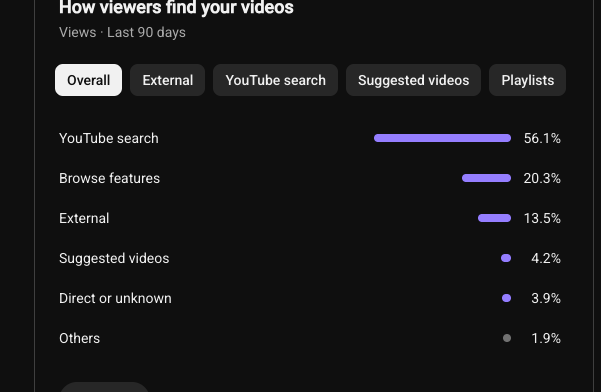
here is the 90 days of youtube data.
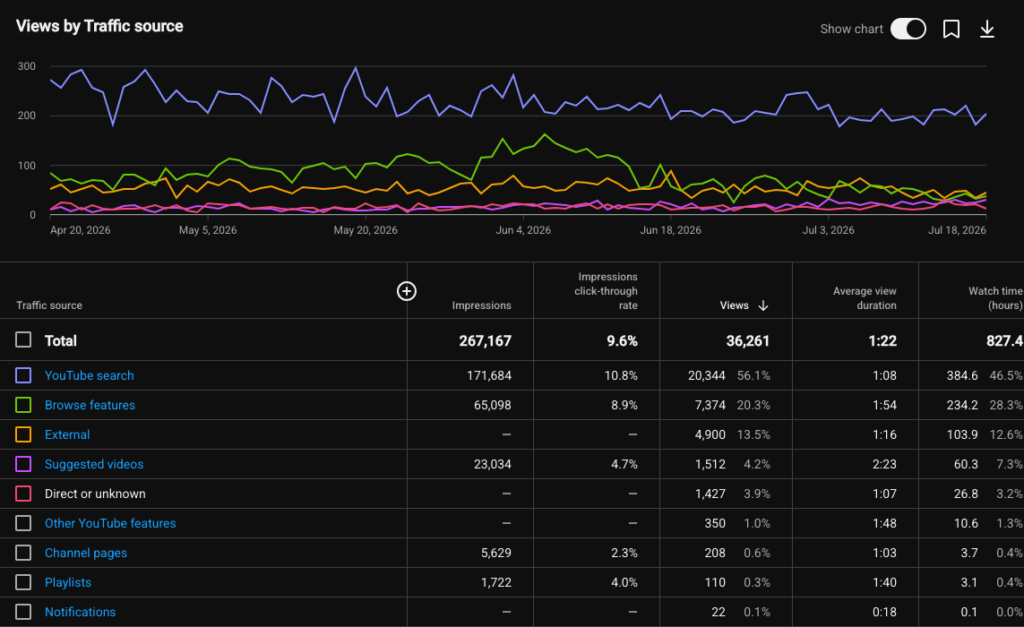
Based on the screenshots, YouTube Search is the largest traffic source, followed by Browse features and Suggested videos.
This suggests that the creator’s channel performs well in two ways. First, viewers actively search for topics covered in the videos, which indicates that the creator is good at producing problem-solving, review, and tutorial content. Second, strong Browse and Suggested traffic means YouTube also recommends the videos to people who may not be searching for them directly.
For a new or lesser-known camera-lens brand, one video may not be enough to build awareness. A three-video content series could work better:
- A Brand Camera Lens Review
Introduce the product, explain its main features, and show real image results. - A Brand Lens vs Canon or Sony Lens
Compare the new lens with a well-known alternative. This can help the unfamiliar brand appear in relevant searches and suggested-video recommendations. - How to Use the A Brand Lens for Travel Photography
Create a practical tutorial that answers a real audience question and demonstrates the lens in an actual shooting situation.
The brand could also choose an integrated sponsorship within one of the creator’s usual videos. In that case, the product should be connected naturally to the topic instead of appearing as a separate advertisement.
The key idea is:
Search traffic can introduce the product to people looking for answers, while Browse and Suggested traffic can help the product reach a wider audience through YouTube’s recommendation system.
Use Audience Retention to Plan the Video
Audience retention is one of the most useful reports for content planning because it shows where viewers continue watching, rewatch a section, skip ahead, or leave.
Brands should pay particular attention to:
- The first 30 seconds
- The moment the sponsor is introduced
- The first product demonstration
- Technical explanations
- Comparison sections
- The final call to action
A large drop at the beginning may mean the introduction is too slow. If viewers leave when the sponsorship starts, the brand message may feel disconnected from the main content. If retention increases during tests or demonstrations, the audience may value evidence more than specifications.
YouTube’s retention reports identify intros, top moments, spikes, and dips, helping creators see which parts of a video maintain or lose attention.
The brand can use this information to make specific changes:
- Show the final result before explaining the product
- Shorten the company introduction
- Introduce the product through a real customer problem
- Replace a list of specifications with a practical demonstration
- Move the most important benefit before a common drop-off point
- Place the CTA before the audience becomes too small
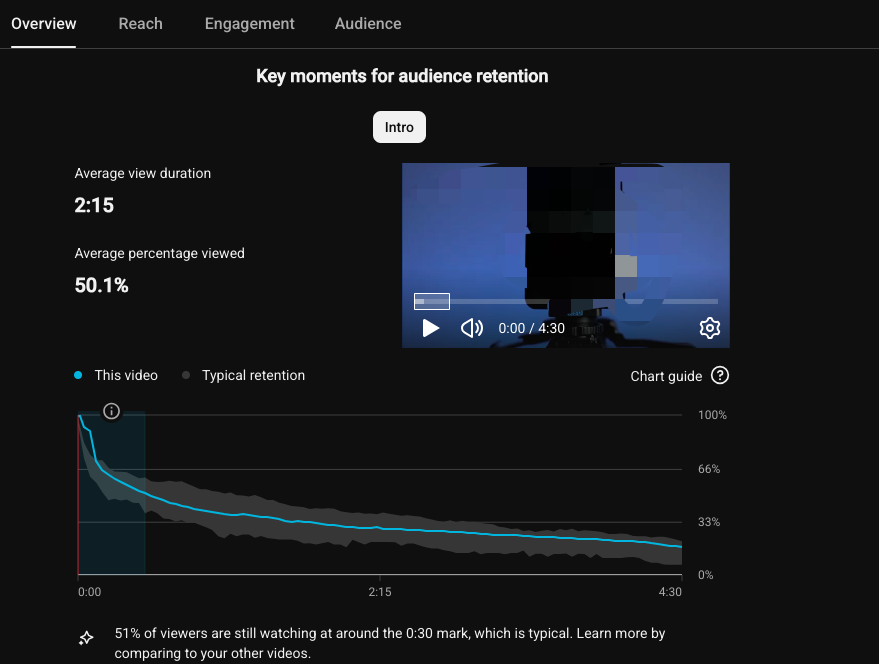
This 4-minute-30-second video has an average view duration of 2:15 and an average percentage viewed of 50.1%. This means the average viewer watched about half of the video.
The most important finding appears in the opening. At the 30-second mark, 51% of viewers were still watching, meaning almost half of the audience left during the introduction. However, YouTube labels this result as “typical,” so it is not unusually poor compared with the creator’s recent videos of a similar length. YouTube uses the first 30 seconds to measure intro retention and compares typical retention with recent videos of a similar duration.
For the brand, the first 30 seconds offer the clearest opportunity for improvement. The video should quickly show:
- The problem being solved
- The final result
- Why the product is relevant
- What viewers will learn by continuing
The data does not mean that every viewer leaves at exactly 2:15. Instead, it shows that the brand should not save the strongest demonstration or buying message until the end.
Recommended Content Change
Original approach: Menu introduction → feature explanation → demonstration → final result → CTA
Improved approach: Final result → viewer problem → product introduction → practical demonstration → key feature → CTA → additional details
Turn the Data into a Content Strategy
The analytics review should end with a content plan, not only an approval or rejection decision.
| Analytics finding | Possible meaning | Recommended strategy |
|---|---|---|
| Search traffic is strong | Viewers actively seek answers | Tutorial, comparison, review, or buying guide |
| Browse traffic is strong | Topic and packaging drive performance | Strong thumbnail, headline, and opening |
| Early retention is weak | The opening is slow or unclear | Show the result and value earlier |
| Demonstrations retain viewers | The audience wants evidence | Add tests, samples, and real use cases |
| Technical sections lose viewers | Specifications feel abstract | Explain features through customer problems |
| Many viewers are new | Limited existing brand knowledge | Add clear context and a simple value proposition |
| Regular viewers are strong | The audience trusts the creator | Use a deeper review or long-term test |
| Mobile viewing dominates | Details may be hard to read | Use larger text, close-ups, and simpler visuals |
YouTube also provides Trends insights that can help creators identify what audiences are searching for and discover possible content gaps. These insights can support topic development, although availability and displayed details may vary.
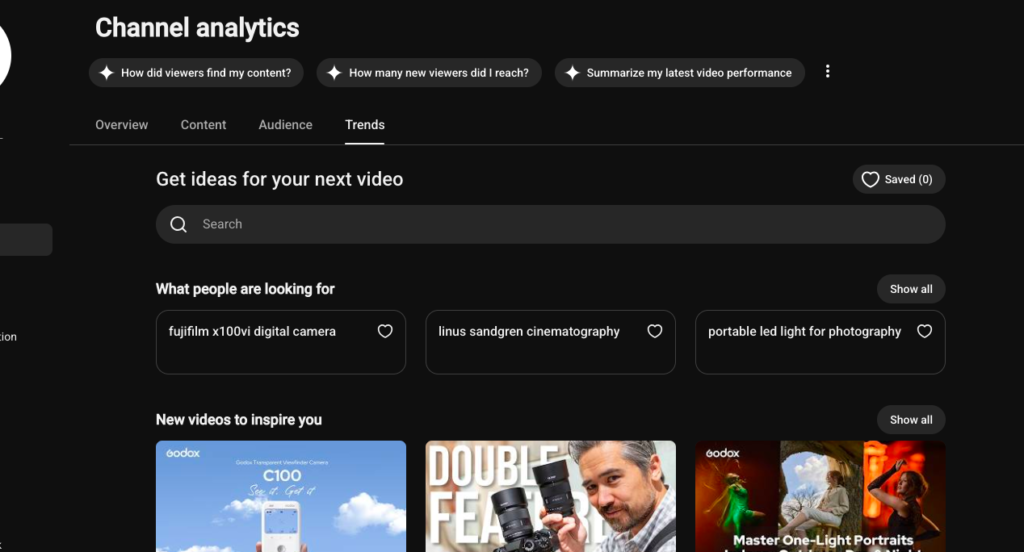
For example,
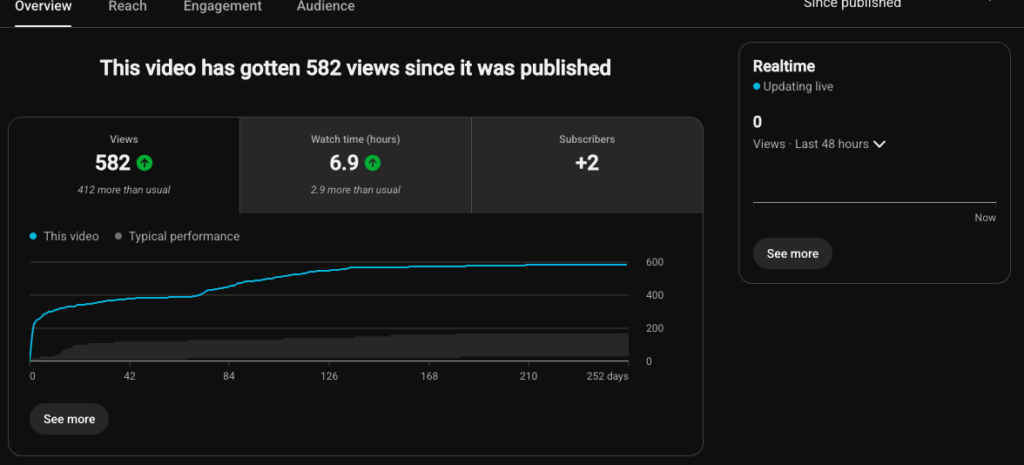
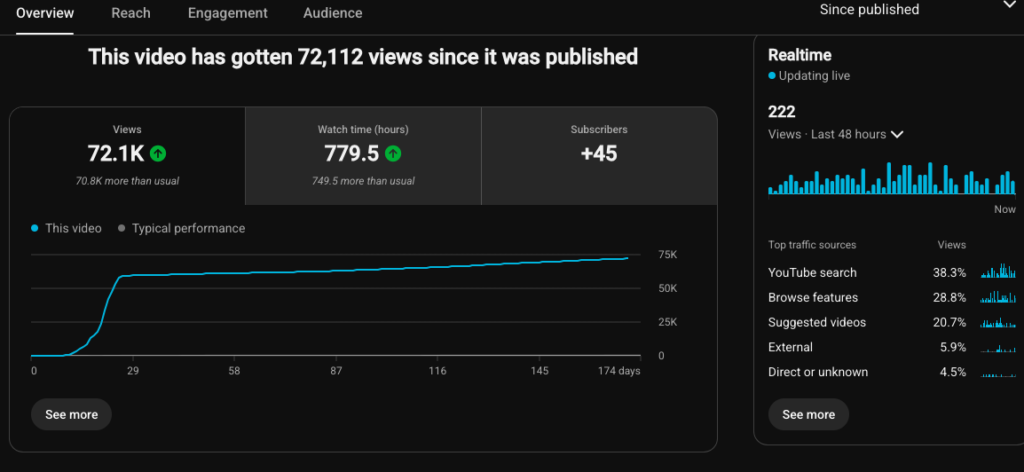
When we launched the product, our first collaboration focused on a standard review. Because we had not analyzed the creator’s YouTube data beforehand, the video achieved only average results. After discovering that the channel performed strongly in YouTube Search, we shifted the content strategy to a problem-solving how-to guide. The new format matched the audience’s search behavior more closely and generated a significant increase in traffic.
Final Checklist
Before approving the collaboration, confirm:
- The audience matches the target customer
- Relevant videos perform consistently
- Traffic mainly comes from Search, Browse, Suggested, or External sources
- The strongest retention sections are understood
- Sponsored content does not repeatedly lose audience trust
- The video format matches existing viewer behavior
- The product appears at the right moment
- The CTA matches the campaign goal
The best analytics review should not end with a simple yes-or-no decision. It should produce a clear plan explaining who the video is for, what problem it should solve, how the product should be demonstrated, and what viewers should do next.